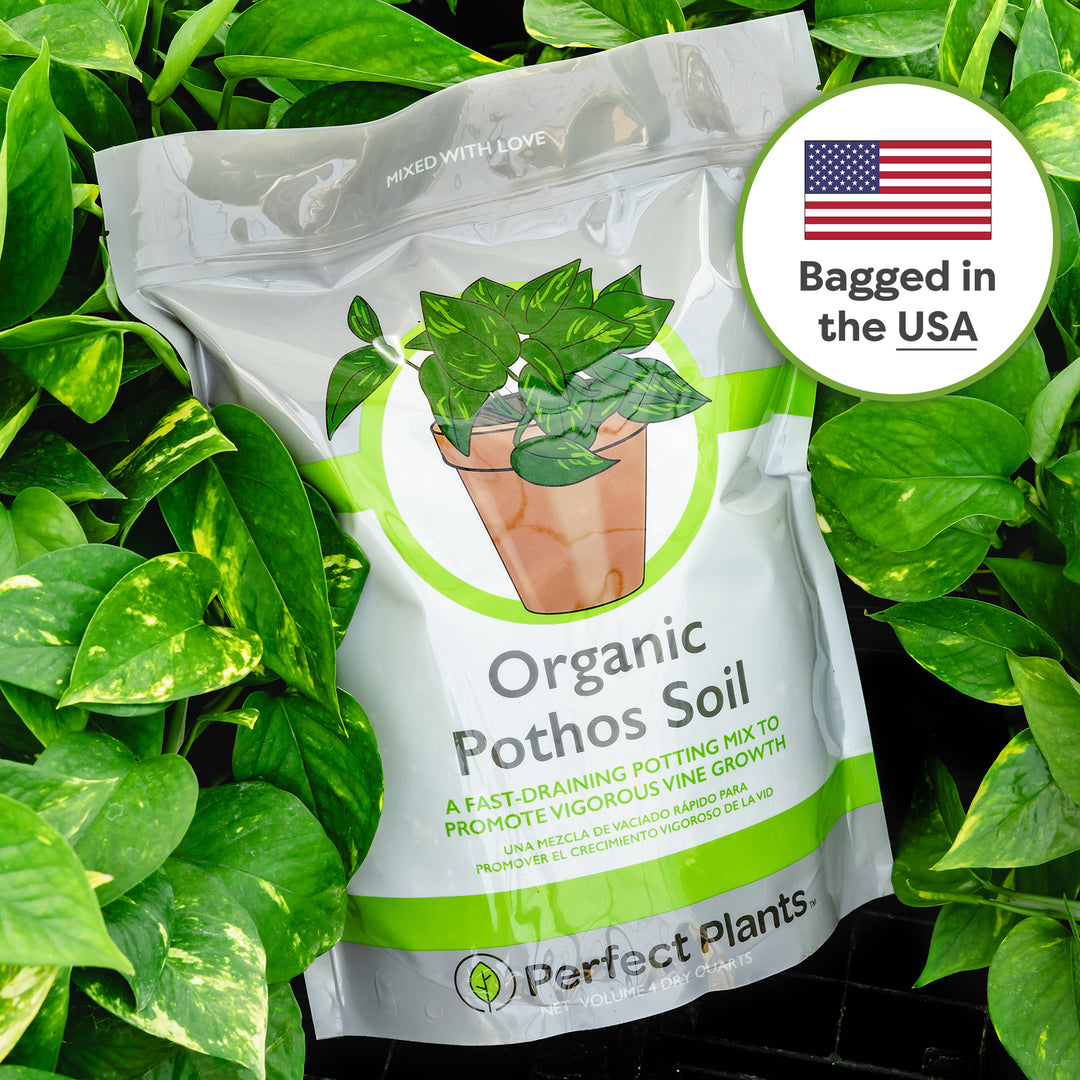
potting soil for pothos plant Organic Pothos Soil - 4 Quart
SKU: 28756157313
potting soil for pothos plant

potting soil for pothos plant Organic Pothos Soil - 4 Quart

Sale price$26.28 Regular price$29.20
Save 10%

Pay in installments of $7.30 with ShopPay, AfterPay and Klarna

Shipping Estimate
USA
  • USA
  • CAN

Ships within 48 hours · Estimated delivery Jun 30 - Jul 5

Promo Codes Available:

For Your Every Summer RSVP, with Code: SUMMER15

Description

potting soil for pothos plant Organic Pothos Soil - 4 QuartSimply the Best Soil for Pothos Perfect Plants Organic Pothos Soil Mix Boosts Drainage, Retains Moisture, and Supports Strong Root Growth Crafted for optimal performance, our nutrient rich, coconut based Pothos Potting Soil provides the ideal balance of drainage, aeration, and moisture retention for thriving pothos plants. Great for beginners and houseplant pros alike. Whether youre wanting to create an indoor jungle retreat for your home, or you

Simply the Best Soil for Pothos

Perfect Plants’ Organic Pothos Soil Mix Boosts Drainage, Retains Moisture, and Supports Strong Root Growth

Crafted for optimal performance, our nutrient-rich, coconut-based Pothos Potting Soil provides the ideal balance of drainage, aeration, and moisture retention for thriving pothos plants. Great for beginners and houseplant pros alike.

Whether you’re wanting to create an indoor jungle retreat for your home, or you simply want to add some life to your office space, the pothos vine is an easy go-to plant for beginners. Most everyone agrees that pothos plants are extremely easy to grow and are refreshingly low maintenance. Our special blend Pothos Soil Mix enhances the growth of your pothos plants!

What Makes This the Best Potting Soil for Pothos?

Our organic pothos growing medium is a coconut based soil blend. This nutrient rich potting mix drains away excess water while locking in essential moisture for optimal root support. Only premium material are used in our pothos soil mix.

  • Composted Pine Bark:This is a wonderful soil conditioner. 
  • Perlite: Created under volcanic conditions, perlite is a porous and lightweight material. It promotes much needed aeration within the soil and helps reduce compaction.
  • Coconut Coir: This lightweight material is a byproduct of the coconut industry. It sheds excess water while retaining moisture.
  • Bark: Allows for good air circulation, adds nutrients, and allows for better water drainage.
  • Sand: Helps facilitate drainage, reduce compaction, and provide good aeration.
  • Garden Lime: This versatile mineral helps balance pH.

Our expertly formulated pothos potting soil comes in sturdy bags comprised of heavy-duty plastic to prevent unwanted tears and spills. Our bags are resealable for added convenience and come in both 4 or 8 quart packages. Our soil is perfect for use in small pots, hanging baskets, and indoor plant stands.

How to Grow the Biggest Pothos

Give your pothos the right growing conditions and it will reward you with vigorous vines, larger leaves, and lush indoor greenery. Whether you’re looking to boost growth, maximize leaf size, or simply keep your plant thriving, these quick-care tips make it easy for anyone to enjoy a beautiful, fast-growing pothos.

  • Watering: Water thoroughly, then let the soil dry out completely before watering again. Aim for about once per week depending on your home’s humidity. Avoid overwatering to prevent root rot.
  • Light Needs: Provide moderate to bright, indirect light for the fastest growth; pothos can adapt to low light, but growth will slow.
  • Temperature: Keep your pothos in warm indoor temps between 65–75°F, similar to its tropical origins.
  • Humidity: Typically thrive in higher humidity but tolerates typical household levels just fine.
  • Growth Boost Tip:  Keep your plant in a bright, warm location to encourage larger leaves and fuller vines; ideal for anyone looking to buy pothos for fast indoor growth.

Why Buy Soil from Perfect Plants?

As a family-run farm since 1980, Perfect Plants hand-mixes premium soil blends under expert care. Grown under Florida sun and packaged with purpose, our resealable bags deliver freshness and quality you can trust.

Perfect Plants is committed to all your garden needs. Be sure to check out our other fabulous potting soil mixes. All our soils are proudly made right here in the United States. No matter what you grow, we’ve got the tools and supplies you need.

Pothos are wonderful indoor plants that purify the air and add lush greenery to your interior spaces. Their heart shaped leaves are often variegated and are beautifully arrayed on long viny stems that can reach 8 feet or longer. Pothos plants come in yellow, green, and white color varieties. What’s more, they’re super easy to take care of!

Though pothos plants can be started in water, they really grow best in soil. When housed in rich quality soil you will see a more robust plant overall. Soil pH should be between 6.1 to 6.8. Fertilize bi-monthly with houseplant food. Repot the plant as needed. If the plant becomes droopy even after watering or if roots are growing out of its drainage holes, this is a sure sign that you need to repot your plant.

Happy planting!

Shipping Notes
  • Free Standard Shipping on $100+ Orders to the USA.
  • Except Preorder products are shipped in 48 hours.
  • Delivery to the USA:
  1. Standard Shipping : 3-10 business days
  • If time is of the essence, please consider selecting expedited delivery for faster service.
Exchange/Return Notes
  • We offer a 30-day return/exchange service after receiving.
  • Final sale items are not eligible for returns or exchanges.
  • To process your return/exchange, please contact us at [email protected]
  • Please click here for more details>>> Return & Exchange Policy
SKU: 28756157313

Discover Niche Categories That Outsell potting soil for pothos plant

Top-Converting Item to Boost Your Average Order

4.4 ★★★★★
Based on 774 reviews
Sort
Highest Rating
Newest First
Oldest First
Product Reviews
A
Verified Purchase
Amazon Customer
Lowell, US
★★★★★ 5
Excellent product for the price.
Style: ET-4800, Color: White, Set: FAX/ADF/Print/Copy/Scan
I have had many, many printers over the many years at the business and for home. I honestly think this is the best value for what I need. The eco tank is fabulous. This is the first printer I have purchased with the ecotank. So much better than the cartridges. The quality is good and it was easy to setup and put on the network. I did wait a few months before writing this review to truly test it out and write a fair review. I am pleased. I have had Epson products in the past and do appreciate their quality and affordability.
WAS THIS REVIEW HELPFUL?YesReportShare
Reviewed in the United States on June 4, 2026
R
Verified Purchase
Robert O. Forsyth Jr.
Fort Morgan, US
★★★★★ 1
JUNK, Cheaply built, Feed Scanner fails and falls apart in less than 5 months and only 4 uses.
Style: ET-4800, Color: White, Set: FAX/ADF/Print/Copy/Scan, Style: ET-4800, Color: White, Set: FAX/ADF/Print/Copy/Scan
Absolute piece of Junk! Built cheaply. Feed Scanner has never worked properly from my first scan (only did 4) and now falls apart completely, in the roller section. It falls out after it jammed for the 7th time today, this time with a SINGLE piece of paper. If you have a piece of paper that has a fold in it, forget about it. That will never feed through. I had 6 sheets I had to get out today, I had to do manually via the flat bed, both sides. It took 23 minutes to get done. Should not have taken 2. The last time I used it same issues but less sheets. The paper is SO TIGHT in the feed section it is hitting BOTH walls. You could not slip a piece of paper in there if you wanted too, most likely one of the reasons it does not feed correctly. While on the phone with support (I am right now, 4th call today and 3 emails of pictures they wanted later, the hoops they put you through is ridiculous!) Of course overseas support and has little to no knowledge of being Tech support, I asked for supervisors only to have my first call disconnect at 1 hour and 20 seconds. Then the next call was 24 minutes, then another 32 minutes and now this one still ongoing (56 minutes and still going). Now after 3 hours and 5 minutes, they are "holding" my credit card for 179.99 + tax to get a REFURB unit! So much for a 5 year Warranty. Oh they acted like it was out of date on Warranty, it has NOT been in EXISTENCE for 5 years , it came out in 2022. Did I fail to mention you WILL be dealing with Overseas people who have you repeat the same thing over and over and over and over again. They wonder why I was getting upset...hmmmm . As they pass you along the ranks you have to repeat EVERYTHING all over again. As I was on the phone and they were asking me to open WRONG doors to find the serial #, I lifted once again the Jam area and guess what, the parts fell out. Just PLOP! Other issues while I am at it, the Picture quality is "OK" nothing special. I bought it to save ink as HP gouges you to death and destroys your print head if you use a knockoff. The Ink has been "OK", but I haven't really had it long enough to tell as most everything has been Black and White, so all are still full except the Black (3.4's). Its a rear feed, I miss the HP draw on that, the print speed again is not fast, just OK. Though never really in a rush with it. I cant say it enough, this is cheaply built, and my experience with Tech Support was a HORRIFIC. I never like dealing with Over seas support as it is, but what they wanted pictures of as proof was mind blowing (pictures of the tubes that go to the ink wells? What does that have to do with the issue at hand.) The panel function is anything but user friendly. Firmware Updates, if not done, will prevent usage until done. You have to download and install ALMOST 30 different files, from drivers to firmware updates the list is endless. Never have I had to do that many of ALL printers I have had combined. Simple ZIP file and let it run on an executable file (EXE)like everyone else. That will take you over 2 hours to get all loaded. The ink wasn't bad seeing it needs to be primed first to work, I am not sure what will happen when the REFURB comes, will I get ink or just have to re-prime from the cartridges. The software for scanning is easy to use, though unnecessary, should just scan and auto save, or am I just spoiled by HP? But to send me a "REFURB" as a replacement on a 5 month old unit with a 5 year warranty is really being low. They did EVERYTHING they could to get me to NOT follow through in this return, you have ONLY 30 days on Amazon. You have been warned, I would look elsewhere, the tank issue is a great Idea, but if it doesn't work, what good does it do.
WAS THIS REVIEW HELPFUL?YesReportShare
Reviewed in the United States on December 8, 2025
M
Verified Purchase
Michael A. Adkins
Grantham, US
★★★★★ 5
First Impressions - Complete Review
Style: ET-4800, Color: White, Set: FAX/ADF/Print/Copy/Scan, Style: ET-4800, Color: White, Set: FAX/ADF/Print/Copy/Scan
Printer Review from an Artist. Printer cost with a 3-year extended warranty - $199.00. Came with four full bottles of Ink. Each bottle was huge, and enough to completely fill up the tanks. In my old Epson printer that used Epson 127 Ink Cartridges a cartridge held 8ml of ink. The cost per cartridge for the XL Black was $31.00 on Amazon. In comparison, a bottle of ink for the tank printer costs $15.00 and holds 65ml. The Epson 127 Ink Cartridge is rated at 175 pages for the XL cartridge and the Tank Printer is rated at 4500 pages per bottle of ink. So, the difference in cost is striking. Unboxing the printer was simple enough. The printer weighs about half the weight of my old Epson printer. The new printer does not have printer drawers but, back feed only. This actually worked out well for me since I was constantly taking the paper in out and out of the drawers when changing paper size. Also, with this direct paper feed, I figure it will handle my heavier weight card stock paper that I use for my art and greeting cards. To my great surprise, the printer offers two-sided printing. This is really handy when printing my Zines. The printer setup was extremely easy as they recommend a phone app, that walks you through each step with pictures. And it communicated perfectly with the phone for the setup. It takes about 15 minutes to completely set up the printer. I have learned to not rush setup. Take your time, and follow the instructions step by step, Which include filling the tanks. Features, * The printer dues Dual-Sided Print - Great for zines. * It has fax capability, but we do not have a landline, so that will not be used. * It does copying, with a document feeder or you can lift the feeder and place the document on the glass. * I mostly use my Epson Precision San copier but it is nice if you wish to make a quick copy of a document. * Some reviews complained about the very small LED display but I find that by using the app or computer I can control all that I need to do. Print Alignment. I did this test but the printer heads did not require any alignment. During the setup process, the program installs the printer driver on my computer. However I found it to be the very basic driver, and I went to the Epson Website and downloaded and installed the latest driver which is very robust and has all the settings that I needed. The printer's footprint is smaller than my old printer. And my old printer had two paper drawers, though I never used the second drawer. Negatives. The output tray is flimsy and seems like it would easily break if bumped when I walked past the printer, so I have to be careful about this. So far I do not see a way of checking the ink levels from the computer. And they said in the instructions to be sure to check your ink levels. You can see on the front of the printer, where you can see the ink levels. When you purchase more ink, you can attach the bottle and it will not overfill the tanks, and you can then use more ink from the bottle later. So I will purchase a complete set of ink and keep it and as it runs low with about 1/4 left in the tank, I will just fill it up. So far I am very happy with the investment and now printing and ink cost is not a major factor. And I figure I will do a lot of printing with this printer when the holiday season rolls around for my greeting cards. As for print quality, I will need to report on this later, though there were no negative reviews of print quality. A test print on regular paper and the colors seemed to be spot on. One note, I still will continue to use my Canon Pro-300 Wide Printer for my Fine Art Prints, but the new Tank Printer will be my studio workhorse.
WAS THIS REVIEW HELPFUL?YesReportShare
Reviewed in the United States on August 11, 2024
E
Verified Purchase
Edisson Salazar
Omaha, US
★★★★★ 4
Frustrating to set up and unreliable
Style: ET-4800, Color: White, Set: FAX/ADF/Print/Copy/Scan
I bought the Epson EcoTank ET-4800 hoping for an easy, low-cost printing solution, but it has been nothing but trouble. The wireless setup is overly complicated, and the printer often loses connection to the network, forcing me to restart it or reinstall the software. Printing is slow, even for simple documents, and the paper feeder sometimes pulls multiple sheets at once. While the EcoTank system is supposed to save money on ink, the print quality is inconsistent — colors can be dull, and black text occasionally appears streaky. Scanning and copying are also sluggish. For the price, I expected something much more reliable.
WAS THIS REVIEW HELPFUL?YesReportShare
Reviewed in the United States on August 9, 2025
I
Verified Purchase
Irving M. Lamansky
Birmingham, US
★★★★★ 5
ET-4800 EZ PZ set up and start up. Prints and scans just fine
Style: ET-4800, Color: White, Set: FAX/ADF/Print/Copy/Scan, Style: ET-4800, Color: White, Set: FAX/ADF/Print/Copy/Scan
An excellent home printer. And why did I purchase such? I had an Epson WF-520 for nearly ten years. But neglect and lack of use caused the printer head to get gunked up. I cleaned the print heads using a solution of 95% Etoh and glass cleaner (about fifty/fifty), a syringe with a plastic tube attached and LOTS of paper towel strips. It was moderately successful but I was never able to get it back to like new printing. I looked over several new printers and wanted to stay with Epson because of ease of use (copy, scanning, printing). Seems as tank printers are the way to go these days. So I ordered the ET-4800. Got here in only a couple of days. Setup was pretty easy, just follow the instructions either via the documentation included or online version. I have pinted and scanned a color test page. I used the built in SmartScan feature without having to think about it much. I am quite satisfied with the results. By the way, there is no automatic two side printing. You actually have to get off your b---, take out the first printing, turn it over and refeed the stack. I was used to doing that with the old WF-520 and never had a problem. I will now set up a once a week, automatic scheduled printing task. I will just have to make sure there is paper on hand. Lack of use is the killer of these inkjet machines regardless of manufacturer.
WAS THIS REVIEW HELPFUL?YesReportShare
Reviewed in the United States on February 16, 2026

recommand products